Digital Clock Using Thread in JAVA
this given example is display digital clock for user it takes time from working system and display it on the JFrame with the help of thread and swing package.
Program:
import java.util.*;
import java.text.*;
import javax.swing.*;
import java.awt.*;
import java.awt.event.*;
class ClockScreen extends JFrame{
private JLabel timeString,lbl_digi;
public JButton start;
Thread t;
public ClockScreen(Thread t){
this.setTitle("Digital Clock");
this.setVisible(true);
this.setDefaultCloseOperation(JFrame.EXIT_ON_CLOSE);
this.setSize(200,130);
this.setLayout(null);
this.setLocation(GraphicsEnvironment.getLocalGraphicsEnvironment().getCenterPoint().x-this.getWidth()/2,GraphicsEnvironment.getLocalGraphicsEnvironment().getCenterPoint().y-this.getHeight()/2);
this.t=t;
Font font = new Font("Courier", Font.BOLD,20);
lbl_digi=new JLabel("Digital Clock");
lbl_digi.setBounds(10,10,180,20);
lbl_digi.setFont(new Font("Vardana",Font.BOLD,16));
lbl_digi.setHorizontalAlignment(JLabel.CENTER);
lbl_digi.setVerticalAlignment(JLabel.CENTER);
timeString=new JLabel();
timeString.setBounds(10,30,180,20);
timeString.setFont(font);
timeString.setHorizontalAlignment(JLabel.CENTER);
timeString.setVerticalAlignment(JLabel.CENTER);
start=new JButton("Stop");
start.setBounds(10,60,180,30);
start.addActionListener(new ActionListener() {
public void actionPerformed(ActionEvent e){
try{
if(start.getText().equals("stop")){
start.setText("start");
ClockScreen.this.t=Thread.currentThread();
ClockScreen.this.t.yield();
System.out.println("jiten");
}else{
start.setText("stop");
}
}catch(Exception ex){
System.out.println("Error:"+ex.getMessage());
}
}
});
add(timeString);
add(lbl_digi);
add(start);
}
public void setLabelValue(String value){
timeString.setText(value);
}
}
class clock implements Runnable{
int hour,minute,second;
String strTime;
private Thread t;
private ClockScreen c1;
private String threadName;
public clock( String name){
threadName = name;
System.out.println("Creating " + threadName );
c1=new ClockScreen(t);
}
public void run() {
System.out.println("Running " + threadName );
try {
int i=Calendar.getInstance().get(Calendar.SECOND);
while(true){
Calendar cal=Calendar.getInstance();
hour=cal.get(Calendar.HOUR_OF_DAY);
if(hour >12)
hour-=12;
minute=cal.get(Calendar.MINUTE);
second=cal.get(Calendar.SECOND);
SimpleDateFormat formatter=new SimpleDateFormat("HH:mm:ss");
Date date=cal.getTime();
strTime=formatter.format(date);
System.out.println(strTime);
System.out.println("Thread: " + threadName + ", " + second+"\t i:"+(i));
c1.setLabelValue(strTime);
/*if((second-i)>=10)
System.exit(0);*/
Thread.sleep(1000);
}
} catch (InterruptedException e) {
System.out.println("Thread " + threadName + " interrupted.");
}
System.out.println("Thread " + threadName + " exiting.");
}
public void start ()
{
System.out.println("Starting " + threadName );
if (t == null)
{
t = new Thread (this, threadName);
t.start ();
}
}
}
public class DigitalClock{
public static void main(String [] args){
clock c1=new clock("First");
c1.start();
}
}
run this program by following command:
<complilation>$javac DigitalClock.java
<run>$ java DigitalClock




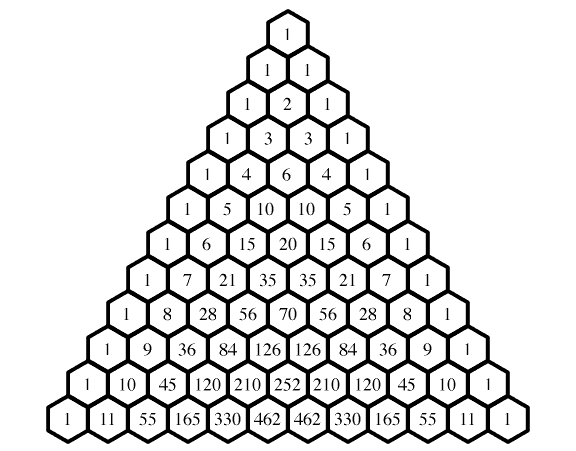
 appears in the nth row and kth column of Pascal's triangle. A simple construction of the triangle proceeds in the following manner: In row 0, the topmost row, the entry is
 (the entry is in the zeroth row and zeroth column). Then, to construct the elements of the following rows, add the number above and to the left with the number above and to the right of a given position to find the new value to place in that position. If either the number to the right or left is not present, substitute a zero in its place. For example, the initial number in the first (or any other) row is 1 (the sum of 0 and 1), whereas the numbers 1 and 3 in the third row are added to produce the number 4 in the fourth row.


